
Reporting Vacation Pay for Classified School Members
May 18, 2026
Circular Letter: 200-023-26
Topic: Payroll
To: All CalPERS School Employers
Purpose
The purpose of this Circular Letter is to provide guidance to school employers regarding the proper reporting of vacation pay for classified school members. This guidance is intended to ensure compliance with the Public Employees’ Retirement Law (PERL) and the Public Employees’ Pension Reform Act of 2013 (PEPRA), specifically Government (Gov.) Code sections 20630, 20636.1, and 7522.34.
Vacation Pay Reporting Guidelines
Definition of Compensation
Under Gov. Code section 20630(a), compensation includes payment for services performed during normal working hours or for time excused from work, such as vacation.
Payouts for unused vacation, regardless of how or when they are reported or paid, are not reportable compensation. For example, for classified school members who cannot take vacation during the school year due to operational constraints, unused vacation time paid out at the end of the school year or during designated breaks (e.g., winter or spring breaks) when the member is not scheduled to work does not qualify as reportable compensation. Similarly, payouts for unused vacation that are prorated over the year during months in which the member performed services do not meet the definition of compensation and are not reportable. These payouts are not for time when the member is excused from work; rather, they represent cash-outs of accrued vacation during periods when no work is scheduled and are in excess of payments for services performed during normal working hours.
Gov. Code section 7522.34(c)(5) provides additional clarity for PEPRA members by explicitly excluding payments for unused vacation, annual leave, or similar compensatory time off from pensionable compensation. This provision reinforces the principle that such payouts, regardless of how or when they are reported or paid, do not qualify as compensation for services performed during normal working hours or time excused from work and are therefore not reportable to California Public Employees' Retirement System (CalPERS) for pension calculation purposes.
Compliance Requirements
To comply with statutory and regulatory requirements:
- Vacation Time Usage: Vacation pay must only be reported for time excused from work and must not exceed normal working hours or normal work schedules.
- Prohibited Practices: Vacation payouts are not reportable compensation under the PERL or PEPRA. These payouts are not for time excused from work, where accrued vacation pay is used as payment for services rendered during normal working hours.
- Publicly Available Pay Schedules: Compensation reported to CalPERS must align with the definitions of "compensation earnable" and "pensionable compensation" under Gov. Code sections 20636.1 and 7522.34. These statutes require that payrate and pensionable compensation be the normal monthly rate of pay or base pay for services rendered during normal working hours, pursuant to publicly available pay schedules.
Determining Vacation Pay Reportability
School employers are encouraged to maintain and use duty calendars to determine vacation pay reportability to CalPERS. Duty calendars clearly outline scheduled workdays, holidays, and non-workdays for classified school members. Because classified school members can have varied schedules, including some members who work during designated breaks, it is critical for school employers to compare work schedules and report vacation pay only during periods when the employee is scheduled to work. To ensure compensation compliance, duty calendars should accurately reflect the employees’ work schedules. Misuse or misinterpretation of duty calendars could result in inaccurate compensation reporting to CalPERS, which may require future corrections.
Example
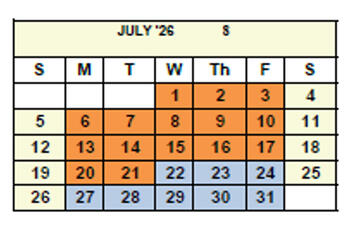
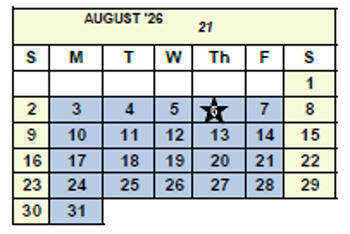
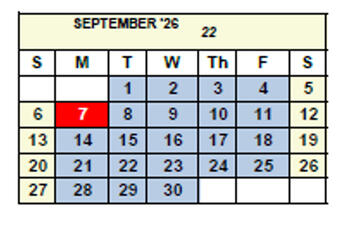
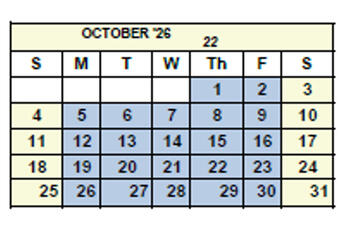
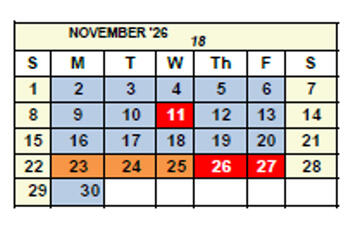
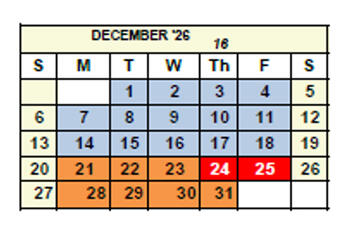
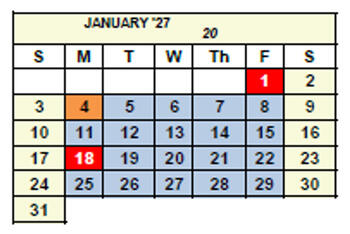
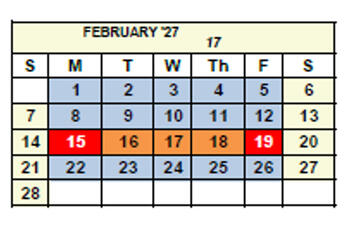
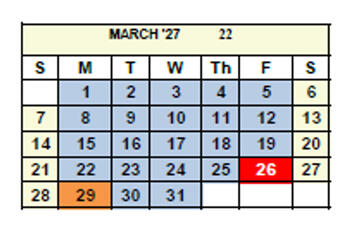
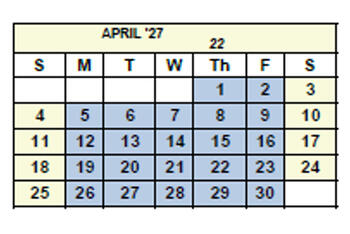
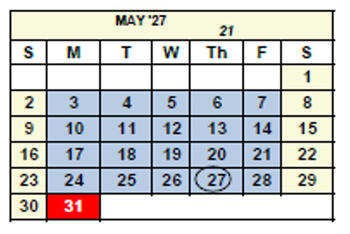
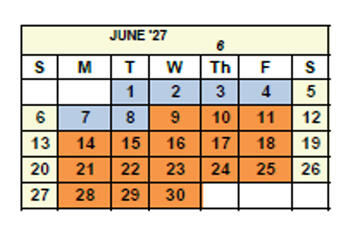
The following example includes calendars that are marked to identify:
- First Work Day: July 22, 2026
- Last Work Day: June 8, 2027
- Calendar Duration: 12 Months
- School Start Day: August 6, 2026 (marked with star symbol)
- School End Day: May 27, 2027 (marked with circle symbol)
- Holidays (marked in red)
- Scheduled Workdays (marked in blue)
- Non-Workdays (marked in orange)
For the hypothetical duty calendar below, vacation pay reportability is determined as follows:
- If an employee is excused from work and uses a vacation day, or any portion thereof, on a workday (blue day), it is reportable to CalPERS.
- If an employee is paid by using vacation pay on a non-workday (orange day), it is not reportable to CalPERS.
This method ensures school employers accurately distinguish between reportable and non-reportable vacation pay based on the employee’s designated work schedule.
Impact of Non-Compliance
Failure to comply with these requirements may result in:
- Administrative holds on member accounts, delaying retirement benefits.
- Financial liabilities for employers and members due to overpayments or adjustments.
Next Steps for Employers
To ensure compliance:
- Review and revise payroll practices to align with the statutory and regulatory requirements outlined above.
- Report vacation pay only for time excused from work and in accordance with Gov. Code sections 20630, 20636.1, and 7522.34.
- Discontinue the practice of prorating and/or reporting vacation payouts.
Additional Resources
Additional information related to vacation pay, compensation earnable, pensionable compensation, special compensation, written labor policy language, publicly available pay schedules, and Circular Letters can be found on our Compliance in Compensation Reporting webpage.
Questions
Questions related to compensation compliance and reporting can be emailed to the Employer Account Management Division, Audit Compliance and Resolution Section at MOU_Review@calpers.ca.gov or you may call our CalPERS Customer Contact Center at 888 CalPERS (or 888-225-7377888-225-7377).
Brad Hanson, Chief
Employer Account Management Division